Tutorial#
Create and Simulate a Simple Network#
Just like PymoNNto, each Network in PymoNNtorch is composed of NeuronGroup s, which indicates the neuronal population, and possible SynapticGroup (s), which defines the synaptic connection between the NeuronGroup s. Network is the main container of all network objects (including itself) and hence, should be defined first. For instance, to create a network of 1000 neurons with regressive synaptic connections, we write:
from pymonntorch import *

net = Network()
ng = NeuronGroup(net=net, size=1000, behavior={})
syn = SynapseGroup(net=net, src=ng, dst=ng, tag='GLUTAMATE')
So far, ng has been added to network net and synaptic connection has been defined to connect ng to itself, i.e. both afferent and efferent synapses of ng are syn. By default, each network and its components are created on CPU and the data type of any tensor inside the objects is set to torch.float32. To change these settings on creation, simply, fill the arguments of the network with your desired device and dtype.
To have a functioning network, we can write Behavior (s) for different network objects to define dynamics and attributes for them. To do so, we can proceed as follows:
class BasicBehavior(Behavior):  # Any user-defined behavior should inherit pymonntorch.NetworkCore.Behavior
    # This behavior is defining dynamics for NeuronGroups
    def initialize(self, neurons):  # override this method to define and initialize attributes. This is called upon calling Network's initialize method.

        super().initialize(neurons)  # Always remember to call the super method to ensure all objects and tensors are located on the same device.

        neurons.voltage = neurons.vector(mode="zeros")
        self.threshold = 2.0

    def forward(self, neurons):  # override this method to define what happens in each iteration of the simulation.
        firing = neurons.voltage >= self.threshold
        neurons.spike = firing.byte()
        neurons.voltage[firing] = 0.0 # reset

        neurons.voltage *= 0.9 # voltage decay
        neurons.voltage += neurons.vector(mode="uniform", density=0.1)
Now, we can modify the instantiation of ng by:
ng = NeuronGroup(net=net, size=1000, behavior={1: BasicBehavior()})
Note that each behavior is given an index upon being assigned to a network object. This indexing scheme indicates the order in which the behaviors should be initialized and then, simulated in each iteration. For instance, assume we have also defined a behavior as follows:
class InputBehavior(Behavior):
    def initialize(self, neurons):
        super().initialize(neurons)

        for synapse in neurons.afferent_synapses['GLUTAMATE']:
            synapse.W = synapse.matrix('uniform', density=0.1)
            synapse.enabled = synapse.W > 0

    def forward(self, neurons):
        for synapse in neurons.afferent_synapses['GLUTAMATE']:
            neurons.voltage += synapse.W@synapse.src.spike.float() / synapse.src.size * 10
Now, assume we have defined ng by:
ng = NeuronGroup(net=net,
                 size=1000,
                 behavior={
                    1: BasicBehavior(),
                    2: InputBehavior()
                })
In this manner, the attributes defined in BasicBehavior are initialized, and then the ones defined in InputBehavior. Moreover, in each iteration of the network simulation, the dynamics defined in BasicBehavior’s forward method are applied prior to the ones for InputBehavior.
To initialize and simulate the network for 1s, we write:
net.initialize()
net.simulate_iterations(1000)
Monitoring The Simulation#
In most simulations, we need to keep track of variables through time. To do so, the so-called Recorder modules is useful, as it saves a buffer of the variable(s) we intend to track throughout the simulation. Let’s add recorders to track the voltage and spike activity of neurons in ng in above example:
net = Network()
ng = NeuronGroup(net=net,
                size=1000,
                behavior={
                    1: BasicBehavior(),
                    2: InputBehavior(),
                    9: Recorder(['voltage', 'torch.mean(voltage)']),
                    10: EventRecorder(['spike'])
                })
SynapseGroup(ng, ng, net, tag='GLUTAMATE')
net.initialize()
net.simulate_iterations(1000)
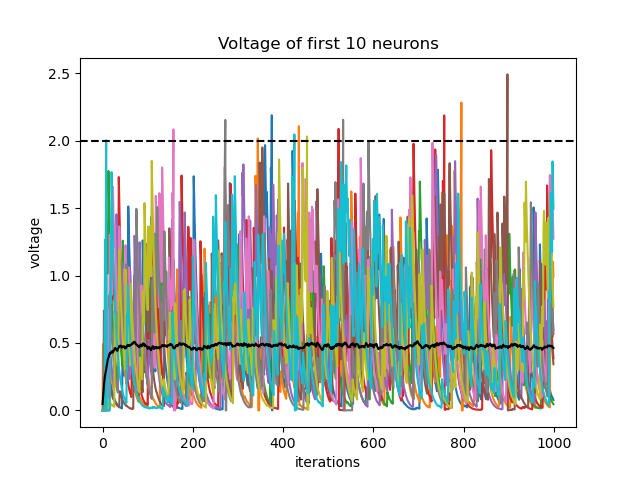
EventRecorder is a subclass of Recorder which facilitates tracking of sparse boolean tensors by saving them in memory-efficient way (key-value scheme). Note that we have defined the two recorders in some late indices (9 & 10) to ensure every change has taken place on the desired variables. We can now plot the recorded variables to observe their behavior throughout the simulation:
import matplotlib.pyplot as plt

plt.plot(net['voltage', 0][:,0:10])
plt.plot(net['torch.mean(voltage)', 0], color='black')
plt.axhline(ng['BasicBehavior', 0].threshold, color='black', linestyle='--')
plt.xlabel('iterations')
plt.ylabel('voltage')
plt.title('Voltage of first 10 neurons')
plt.show()

plt.plot(net['spike.t', 0], net['spike.i', 0], '.k')
plt.xlabel('iterations')
plt.ylabel('neuron index')
plt.title('Raster Plot')
plt.show()